
选自medium
作者:Ansh Gaikwad
机器之心编译
编辑:陈萍
国际象棋是一种在棋盘上玩的双人战略棋盘游戏,棋盘格式为 64 格,排列在 8×8 网格中。有人无聊的时候会找电脑下国际象棋,但也有人无聊了会教电脑下棋。
本文将从 5 个方面进行介绍:
Board 表示;
Board 评估;
移动选择;
测试 AI;
接口测试。
在开始之前,你只需要提前安装 Python3。
Board 表示
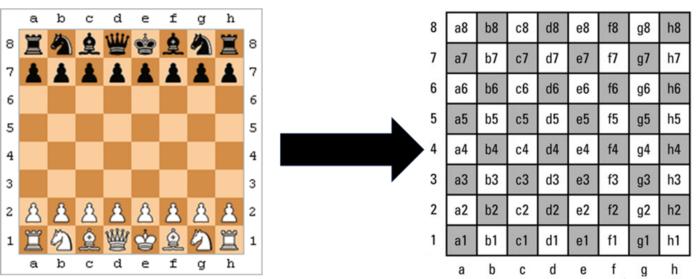
python-chess 库为我们提供了棋子的移动生成和验证,简化了工作,安装方式如下:
!pip install python-chess
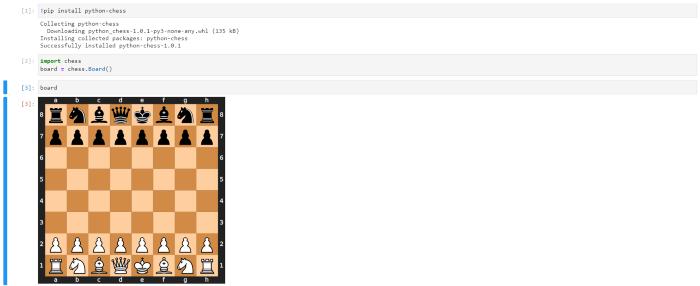
python-chess 库安装好后,导入 chess 模块并进行初始化:
import chess
board = chess.Board()
board
在 notebook 中的输出如下所示:
Board 评估
为了对 board 进行初步评估,必须考虑一位大师在各自比赛中的想法。
避免用一个小棋子换三个兵;
象总是成对出现;
避免用两个小棋子换一辆车和一个兵。
将上述要点以方程形式进行表达:
象 > 3 个兵 & 马 > 3 个兵;
象 > 马;
象 + 马 > 车 + 兵。
通过化简上述方程,可以得到:象 > 马 > 3 个兵。同样,第三个方程可以改写成:象 + 马 = 车 + 1.5 个兵,因为两个小棋子相当于一个车和两个兵。

例如,白色国王越过中线的概率将小于 20%,因此我们将在该矩阵中将数值设置为负值。
再举一个例子,假设皇后希望自己被放在中间位置,因为这样可以控制更多的位置,因此我们将在中心设置更高的值,其他棋子也一样,因为国际象棋都是为了保卫国王和控制中心。
理论就讲这些,现在我们来初始化 piece square table:
pawntable = [
0, 0, 0, 0, 0, 0, 0, 0,
5, 10, 10, -20, -20, 10, 10, 5,
5, -5, -10, 0, 0, -10, -5, 5,
0, 0, 0, 20, 20, 0, 0, 0,
5, 5, 10, 25, 25, 10, 5, 5,
10, 10, 20, 30, 30, 20, 10, 10,
50, 50, 50, 50, 50, 50, 50, 50,
0, 0, 0, 0, 0, 0, 0, 0]
knightstable = [
-50, -40, -30, -30, -30, -30, -40, -50,
-40, -20, 0, 5, 5, 0, -20, -40,
-30, 5, 10, 15, 15, 10, 5, -30,
-30, 0, 15, 20, 20, 15, 0, -30,
-30, 5, 15, 20, 20, 15, 5, -30,
-30, 0, 10, 15, 15, 10, 0, -30,
-40, -20, 0, 0, 0, 0, -20, -40,
-50, -40, -30, -30, -30, -30, -40, -50]
bishopstable = [
-20, -10, -10, -10, -10, -10, -10, -20,
-10, 5, 0, 0, 0, 0, 5, -10,
-10, 10, 10, 10, 10, 10, 10, -10,
-10, 0, 10, 10, 10, 10, 0, -10,
-10, 5, 5, 10, 10, 5, 5, -10,
-10, 0, 5, 10, 10, 5, 0, -10,
-10, 0, 0, 0, 0, 0, 0, -10,
-20, -10, -10, -10, -10, -10, -10, -20]
rookstable = [
0, 0, 0, 5, 5, 0, 0, 0,
-5, 0, 0, 0, 0, 0, 0, -5,
-5, 0, 0, 0, 0, 0, 0, -5,
-5, 0, 0, 0, 0, 0, 0, -5,
-5, 0, 0, 0, 0, 0, 0, -5,
-5, 0, 0, 0, 0, 0, 0, -5,
5, 10, 10, 10, 10, 10, 10, 5,
0, 0, 0, 0, 0, 0, 0, 0]
queenstable = [
-20, -10, -10, -5, -5, -10, -10, -20,
-10, 0, 0, 0, 0, 0, 0, -10,
-10, 5, 5, 5, 5, 5, 0, -10,
0, 0, 5, 5, 5, 5, 0, -5,
-5, 0, 5, 5, 5, 5, 0, -5,
-10, 0, 5, 5, 5, 5, 0, -10,
-10, 0, 0, 0, 0, 0, 0, -10,
-20, -10, -10, -5, -5, -10, -10, -20]
kingstable = [
20, 30, 10, 0, 0, 10, 30, 20,
20, 20, 0, 0, 0, 0, 20, 20,
-10, -20, -20, -20, -20, -20, -20, -10,
-20, -30, -30, -40, -40, -30, -30, -20,
-30, -40, -40, -50, -50, -40, -40, -30,
-30, -40, -40, -50, -50, -40, -40, -30,
-30, -40, -40, -50, -50, -40, -40, -30,
-30, -40, -40, -50, -50, -40, -40, -30]
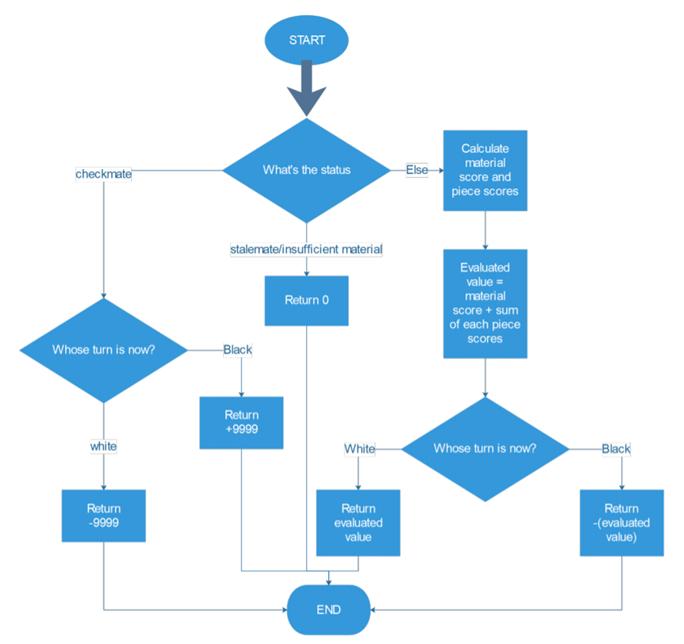
通过以下四种方法得到评估函数:
第一步检查游戏是否还在继续。
这个阶段的背后编码逻辑是:如果它在 checkmate 时返回 true,程序将会检查轮到哪方移动。如果当前轮到白方移动,返回值为 - 9999,即上次一定是黑方移动,黑色获胜;否则返回值为 + 9999,表示白色获胜。对于僵局或比赛材料不足,返回值为 0 以表示平局。
代码实现方式:
if board.is_checkmate():
if board.turn:
return -9999
else:
return 9999
if board.is_stalemate():
return 0
if board.is_insufficient_material():
return 0
第二步,计算总的棋子数,并把棋子总数传递给 material 函数。
wp = len(board.pieces(chess.PAWN, chess.WHITE))
bp = len(board.pieces(chess.PAWN, chess.BLACK))
wn = len(board.pieces(chess.KNIGHT, chess.WHITE))
bn = len(board.pieces(chess.KNIGHT, chess.BLACK))
wb = len(board.pieces(chess.BISHOP, chess.WHITE))
bb = len(board.pieces(chess.BISHOP, chess.BLACK))
wr = len(board.pieces(chess.ROOK, chess.WHITE))
br = len(board.pieces(chess.ROOK, chess.BLACK))
wq = len(board.pieces(chess.QUEEN, chess.WHITE))
bq = len(board.pieces(chess.QUEEN, chess.BLACK))
第三步,计算得分。material 函数得分的计算方法是:用各种棋子的权重乘以该棋子黑白两方个数之差,然后求这些结果之和。而每种棋子的得分计算方法是:该棋子在该游戏实例中所处位置的 piece-square 值的总和。
material = 100 * (wp - bp) + 320 * (wn - bn) + 330 * (wb - bb) + 500 * (wr - br) + 900 * (wq - bq)pawnsq = sum([pawntable[i] for i in board.pieces(chess.PAWN, chess.WHITE)])
pawnsq = pawnsq + sum([-pawntable[chess.square_mirror(i)]
for i in board.pieces(chess.PAWN, chess.BLACK)])knightsq = sum([knightstable[i] for i in board.pieces(chess.KNIGHT, chess.WHITE)])
knightsq = knightsq + sum([-knightstable[chess.square_mirror(i)]
for i in board.pieces(chess.KNIGHT, chess.BLACK)])bishopsq = sum([bishopstable[i] for i in board.pieces(chess.BISHOP, chess.WHITE)])
bishopsq = bishopsq + sum([-bishopstable[chess.square_mirror(i)]
for i in board.pieces(chess.BISHOP, chess.BLACK)])rooksq = sum([rookstable[i] for i in board.pieces(chess.ROOK, chess.WHITE)])
rooksq = rooksq + sum([-rookstable[chess.square_mirror(i)]
for i in board.pieces(chess.ROOK, chess.BLACK)])queensq = sum([queenstable[i] for i in board.pieces(chess.QUEEN, chess.WHITE)])
queensq = queensq + sum([-queenstable[chess.square_mirror(i)]
for i in board.pieces(chess.QUEEN, chess.BLACK)])kingsq = sum([kingstable[i] for i in board.pieces(chess.KING, chess.WHITE)])
kingsq = kingsq + sum([-kingstable[chess.square_mirror(i)]
for i in board.pieces(chess.KING, chess.BLACK)])
第四步,计算评价函数,此时将会返回白棋的 material 得分和各棋子单独得分之和。
eval = material + pawnsq + knightsq + bishopsq + rooksq + queensq + kingsq
if board.turn:
return eval
else:
return -eval
移动选择
算法的最后一步是用 Minimax 算法中的 Negamax 实现进行移动选择,Minimax 算法是双人游戏(如跳棋等)中的常用算法。之后使用 Alpha-Beta 剪枝进行优化,这样可以减少执行的时间。
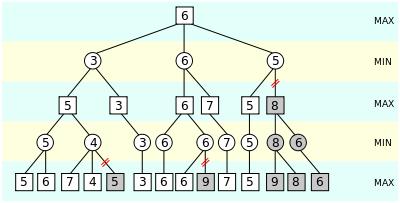
现在让我们深入研究一下 minimax 算法。该算法被广泛应用在棋类游戏中,用来找出失败的最大可能性中的最小值。该算法广泛应用于人工智能、决策论、博弈论、统计和哲学,力图在最坏的情况下将损失降到最低。简单来说,在游戏的每一步,假设玩家 A 试图最大化获胜几率,而在下一步中,玩家 B 试图最小化玩家 A 获胜的几率。
为了更好地理解 minimax 算法,请看下图:
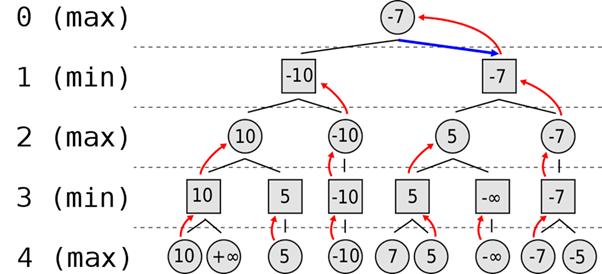
为了得到更好的结果,使用 minimax 变体 negamax,因为我们只需要一个最大化两位玩家效用的函数。不同点在于,一个玩家的损失等于另一个玩家的收获,反之亦然。
就游戏而言,给第一个玩家的位置值和给第二个玩家的位置值符号是相反的。
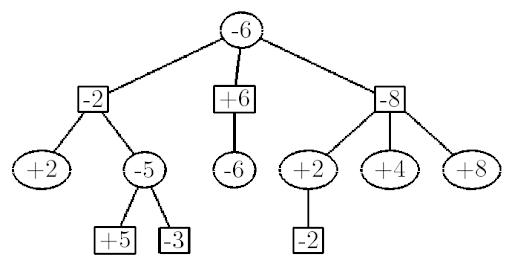
首先,我们将 alpha 设为负无穷大,beta 设为正无穷大,这样两位玩家都能以尽可能差的分数开始比赛,代码如下:
except:
bestMove = chess.Move.null()
bestValue = -99999
alpha = -100000
beta = 100000
for move in board.legal_moves:
board.push(move)
boardValue = -alphabeta(-beta, -alpha, depth - 1)
if boardValue > bestValue:
bestValue = boardValue
bestMove = move
if (boardValue > alpha):
alpha = boardValue
board.pop()
return bestMove
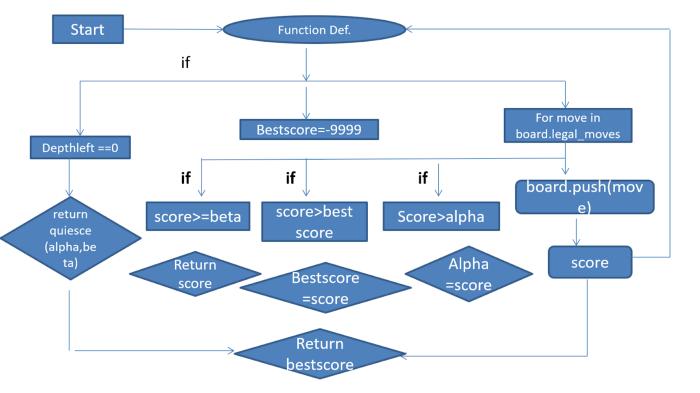
下面让我们以流程图的方式来解释:
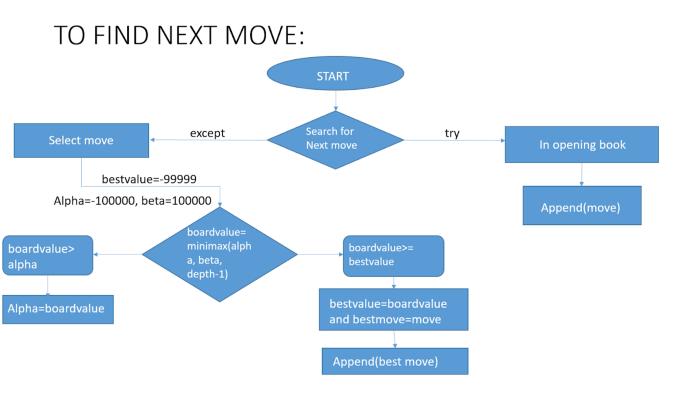
下一步是进行 alpha-beta 的剪枝来优化执行速度。
代码如下:
def alphabeta(alpha, beta, depthleft): bestscore = -9999 if (depthleft == 0): return quiesce(alpha, beta) for move in board.legal_moves: board.push(move) score = -alphabeta(-beta, -alpha, depthleft - 1) board.pop() if (score >= beta): return score if (score > bestscore): bestscore = score if (score > alpha): alpha = score return bestscore
现在,让我们用下面给出的流程图来调整 alphabeta 函数:
代码如下:
def quiesce(alpha, beta):
stand_pat = evaluate_board()
if (stand_pat >= beta):
return beta
if (alpha < stand_pat):
alpha = stand_pat
for move in board.legal_moves:
if board.is_capture(move):
board.push(move)
score = -quiesce(-beta, -alpha)
board.pop()
if (score >= beta):
return beta
if (score > alpha):
alpha = score
return alpha
简单总结一下 quiesce 函数:
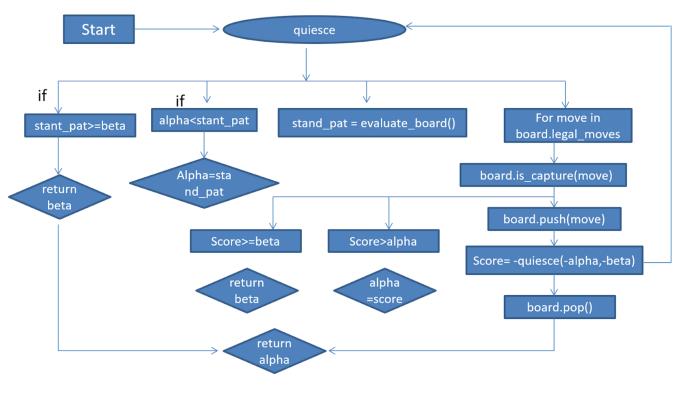
测试 AI
开始测试前,需要导入一些库:
import chess.svg
import chess.pgn
import chess.engine
from IPython.display import SVG
测试有 3 项:
AI 对弈人类;
AI 对弈 AI;
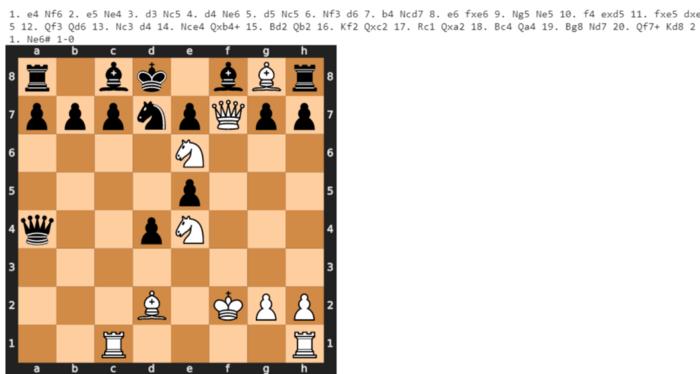
AI 对弈 Stockfish。
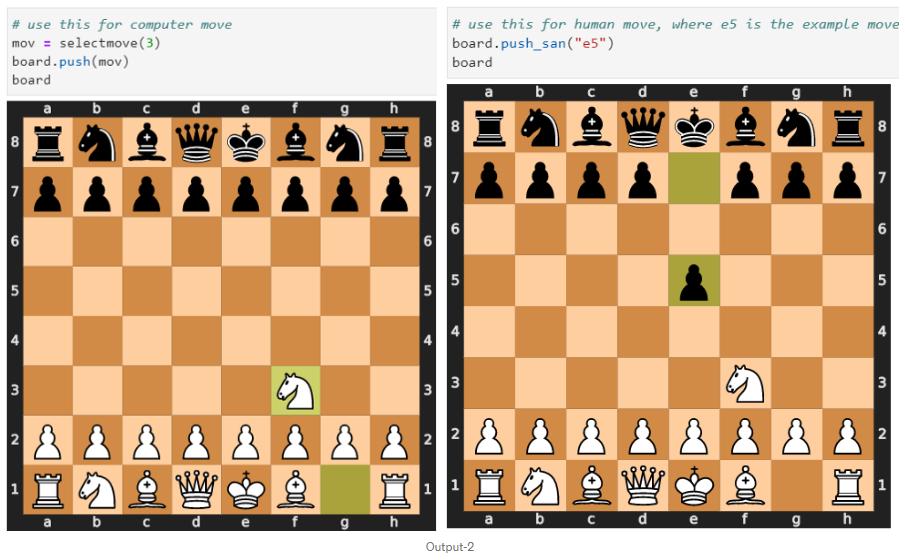
1. AI 对弈人类:
# use this for computer move
mov = selectmove(3)
board.push(mov)
board# use this for human move, where e5 is the example move
board.push_san("e5")
board
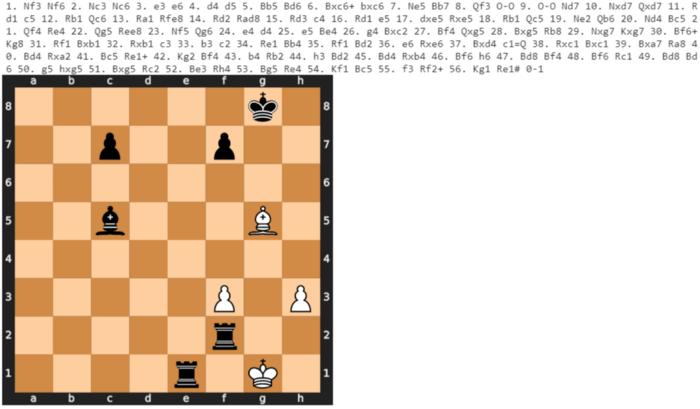
2. AI 对弈 AI:
count = 0
movehistory = []
game = chess.pgn.Game()
board = chess.Board()
while not board.is_game_over(claim_draw=True):
if board.turn:
count += 1
print(f'
{count}]
')
move = selectmove(3)
board.push(move)
print(board)
print()
else:
move = selectmove(3)
board.push(move)
print(board)
game.add_line(movehistory)
game.headers["Event"] = "Self Tournament 2020"
game.headers["Site"] = "Pune"
game.headers["Date"] = str(datetime.datetime.now().date())
game.headers["Round"] = 1
game.headers["White"] = "Ai"
game.headers["Black"] = "Ai"
game.headers["Result"] = str(board.result(claim_draw=True))
print(game)
SVG(chess.svg.board(board=board,size=400))
count = 0
movehistory = []
game = chess.pgn.Game()
board = chess.Board()
engine = chess.engine.SimpleEngine.popen_uci("your_path/stockfish.exe")
while not board.is_game_over(claim_draw=True):
if board.turn:
count += 1
print(f'
{count}]
')
move = engine.play(board, chess.engine.Limit(time=0.1))
movehistory.append(move.move)
board.push(move.move)
print(board)
else:
move = selectmove(3)
movehistory.append(move)
board.push(move)
print(board)
game.add_line(movehistory)
game.headers["Result"] = str(board.result(claim_draw=True))
print(game)
SVG(chess.svg.board(board=board, size=400))
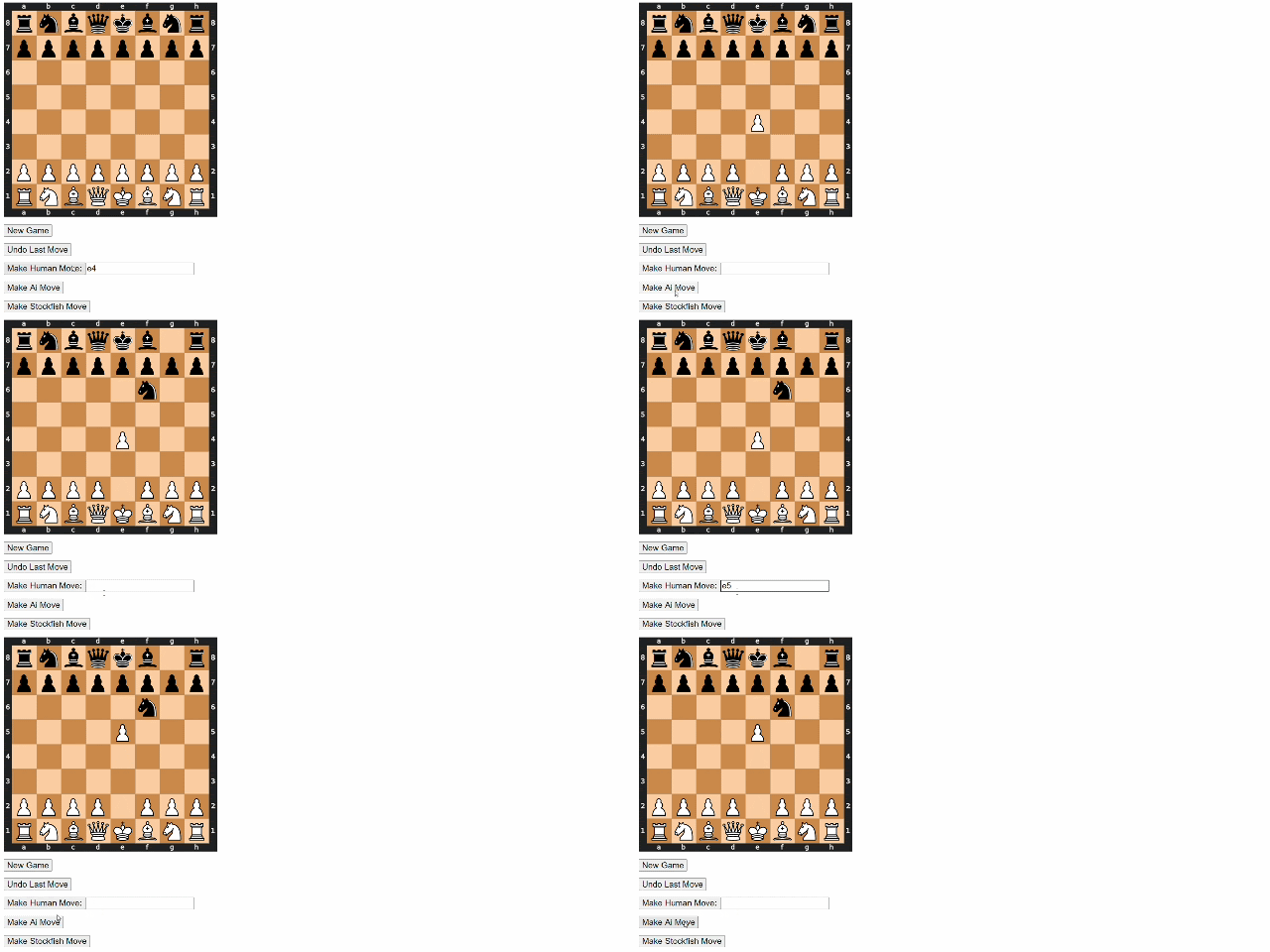
接口测试
上述测试方式看起来代码很多,你也可以写一个接口测试 AI。
# Remaining imports
import traceback
from flask import Flask, Response, request
import webbrowser
# Searching Ai's Move
def aimove():
move = selectmove(3)
board.push(move)
# Searching Stockfish's Move
def stockfish():
engine = chess.engine.SimpleEngine.popen_uci(
"your_path/stockfish.exe")
move = engine.play(board, chess.engine.Limit(time=0.1))
board.push(move.move)
app = Flask(__name__)
# Front Page of the Flask Web Page
@app.route("/")
def main():
global count, board
ret = ''
ret += ''
ret += ''
ret += '
' % time.time()
ret += 'New Game'
ret += 'Undo Last Move'
ret += ''
ret += 'Make Ai Move'
ret += 'Make Stockfish Move'
return ret
# Display Board
@app.route("/board.svg/")
def board():
return Response(chess.svg.board(board=board, size=700), mimetype='image/svg+xml')
# Human Move
@app.route("/move/")
def move():
try:
move = request.args.get('move', default="")
board.push_san(move)
except Exception:
traceback.print_exc()
return main()
# Make Ai’s Move
@app.route("/dev/", methods=['POST'])
def dev():
try:
aimove()
except Exception:
traceback.print_exc()
return main()
# Make UCI Compatible engine's move
@app.route("/engine/", methods=['POST'])
def engine():
try:
stockfish()
except Exception:
traceback.print_exc()
return main()
# New Game
@app.route("/game/", methods=['POST'])
def game():
board.reset()
return main()
# Undo
@app.route("/undo/", methods=['POST'])
def undo():
try:
board.pop()
except Exception:
traceback.print_exc()
return main()
然后执行:
board = chess.Board()webbrowser.open("http://127.0.0.1:5000/")app.run()
原文链接:https://medium.com/dscvitpune/lets-create-a-chess-ai-8542a12afef
原标题:《今天,我们来教AI下国际象棋》